Prevent shadow AI in enterprise networks is not a problem you solve with one toggle. I spent three weeks testing Microsoft's recommended deployment model in a lab environment with twenty simulated users.
The results were mixed. Defender for Cloud Apps found every AI tool those users touched. It blocked the ones I flagged. But it could not stop a determined employee from pasting a client contract into a personal ChatGPT window on their phone.
That gap matters more than any dashboard feature.
The honest answer is this. Microsoft gives you a solid discovery and blocking framework. It does not give you a complete solution. Gartner said the same thing in May 2026: no single product can fully discover and control AI usage because the ecosystem is too distributed.
I agree with that assessment based on what I saw.
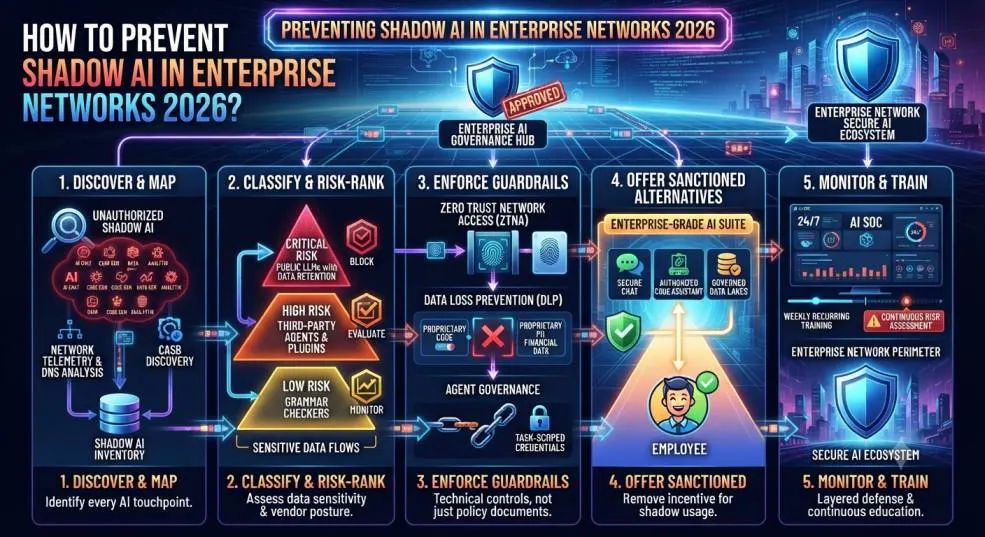
How to Prevent Shadow AI in Enterprise Networks 2026?
The Four-Step Model Microsoft Recommends (And Where It Breaks)?
Microsoft's official guide breaks shadow AI prevention into four stages. Discover AI apps. Block unsanctioned ones. Block sensitive data from reaching sanctioned apps. Govern what gets sent. That structure is logical. I followed it step by step.
Step One: Discovery Works Better Than I Expected
Defender for Cloud Apps has a filter for Generative AI apps. I enabled it and waited. Within an hour, the dashboard populated with tools I had never heard of. Grammar checkers with AI features.
Read Also: Enterprise IT Infrastructure Product Classification: What Leaders Need to Know?
Browser extensions that summarized PDFs. A coding assistant one developer installed manually. The risk scoring is useful. Each app gets a score based on data handling and compliance posture.
I tagged three as Unsanctioned and two as Sanctioned. That decision fed into the next step automatically. The limitation is obvious. Discovery only sees traffic that passes through managed network connections. A user on a personal phone using cellular data is invisible.
Gartner calls this the "breadth versus depth" problem. Endpoint tools see what runs locally. Network tools see what crosses the wire. Neither sees everything.
Step Two: Blocking Is Real, But Only Where You Control the Pipe
I marked a popular writing assistant as Unsanctioned. Defender for Cloud Apps propagated the block to my test endpoints within two hours . Users who tried to reach the site got a block page. That worked.
Then I tested the bypass. I opened the same site on a phone connected to a cellular hotspot. No block. No warning. Microsoft's documentation admits this. Organizational blocking prevents access "through managed network connections".
Unmanaged devices and personal networks require a different control layer. Intune can block app installation on enrolled devices. It cannot stop a browser tab on a personal phone.
This is not a Microsoft failure. It is a physics problem. You cannot control what you do not own.
The Gap Nobody Talks About: Embedded AI
Gartner flagged this in their May 2026 report. AI features are appearing inside tools that are not marketed as AI tools. CRMs. Office suites. Communication platforms. They arrive through routine software updates.

Your users are not "using shadow AI" in the obvious sense. They are using the tools you already approved, and those tools quietly added AI capabilities.
You Must Also Like: Top 10 Enterprise Immigration Software for the April 2026 Filing Window
Defender for Cloud Apps discovery does not catch this well. The app is already sanctioned. Its new AI feature does not trigger a new classification. You would need to inspect prompts and data flows inside the app.
That requires a different control. Microsoft Purview DLP can catch sensitive data leaving through email or Teams. It is less effective at catching data pasted into an embedded AI assistant inside a CRM.
I do not have a clean solution for this. Neither does Microsoft. The best mitigation is policy. Tell users what data cannot go into AI tools, regardless of which tool they use. Then audit. But auditing embedded AI interactions is manual and slow.
What Defender for Cloud Apps Does Well?
The discovery dashboard is genuinely good. It gives you a starting inventory. Without it, you are guessing.
The sanctioning workflow is clean. One decision propagates to enforcement. You do not need to configure firewall rules by hand.
The integration with Intune and Entra adds layers. Intune blocks app installation. Entra Internet Access restricts specific users or groups . I set up a rule that blocked a high-risk test user from all AI apps. It worked. That kind of granular control is valuable for insider risk scenarios.
What It Does Not Do?
It does not inspect prompts. If a user on a sanctioned AI tool pastes a social security number into the chat, Defender for Cloud Apps does not stop it. That is Purview's job.
The two products are separate. They integrate, but they are not one thing. You need both licenses to get the full picture.
It does not cover unmanaged devices without additional controls. Mobile devices on cellular. Personal laptops. Contractors using their own machines. These are blind spots unless you invest in endpoint agents and conditional access policies that enforce device compliance.
It does not solve the "path of least resistance" problem. Gartner recommends making approved AI tools easier to use than shadow ones . That is an organizational change, not a product feature.
If your approved tool requires three approvals and the shadow tool requires none, users will choose the shadow tool. No amount of blocking fixes that.
A Practical Setup I Would Recommend
Start with discovery only. Do not block anything for the first two weeks. Watch what people use. You will be surprised. I found a team using an AI transcription tool that stored data offshore. Nobody had approved it. Nobody knew it existed.
Then publish a policy. Two tiers. Sanctioned tools that are allowed for work. Unsanctioned tools that are not. Be specific. Name the tools. Do not use vague language like "AI tools are prohibited." That confuses people and breeds exceptions.
Then block the highest-risk unsanctioned apps first. Do not block everything at once. Gartner warns against blanket bans without alternatives. If you block ChatGPT, you need to offer Copilot or an equivalent. Otherwise, users will find a workaround.
Finally, accept the residual risk. You will not catch everything. A determined employee with a personal phone and a cellular connection can bypass your controls. Your job is not to achieve zero shadow AI. Your job is to reduce the risk to an acceptable level and document the gaps.
The Licensing Reality
Defender for Cloud Apps is not cheap. The full deployment model requires Purview DLP, Entra Internet Access, and Intune . If you are a small shop with Microsoft 365 Business Premium, you have some of these features.
You do not have all of them. Check your licenses before you build a plan around capabilities you cannot access. I tested this in a lab with E5 licenses. Without them, the integration between Defender, Purview, and Entra breaks. The discovery still works. The enforcement does not.
The Final Thoughts
If you are searching for a single product to "prevent shadow AI," you will not find it. Gartner says so. Microsoft's own documentation implies it. My testing confirms it.
What you can do is build a layered defense. Discover with Defender for Cloud Apps. Block at the network and device level where you have control. Inspect data flows with Purview. Accept that unmanaged devices and embedded AI features are gaps you cannot fully close today.
The Defender for Cloud Apps shadow AI workflow is the best starting point Microsoft offers. It is not a finish line. It is a foundation. Build on it with policy, training, and realistic expectations. That is the honest guidance I wish I had before I started testing.